- unmigrated-wiki-markup
Documentation for Automation with AWS AWS 1.1 – other releases are available in the Automation with AWS Documentation Directory.
View
or visit the current documentation home.
Using the Automate with AWS then action in JIRA Service Desk
Use the Automate with AWS then action to run remote actions with AWS from JIRA Service Desk automation rules.
On this page:
Related pages:
- Identity Federation for AWS
- Atlassian JIRA Service Desk
Configuration
To configure an Automate with AWS then action:
- Follow the steps in Automating your service desk
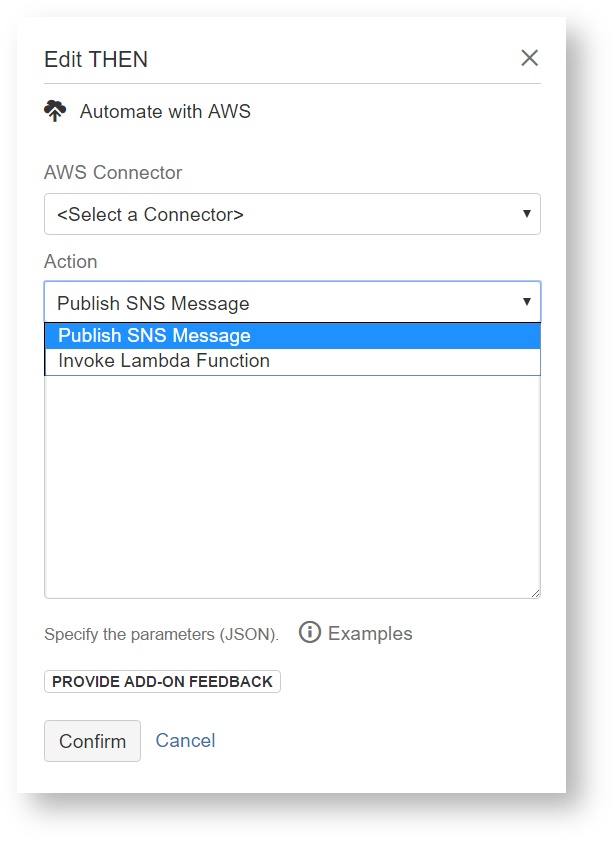
- When editing the THEN field, select the Automate with AWS then action
Complete the following settings:
AWS Connector Select the shared Identity Federation for AWS connector.
Action Select the remote AWS action. Configure the selected AWS action's parameter template as documented for each action:
-
Entity Variables
You can inject contextual variables with workflow entities into the remote action payload templates. The applicable entities for the JIRA then action are:
Examples
The examples are currently composed to reference only core entity variables – you can also reference all JIRA specific entity variables, for example ${issue.fields.summary}.
-
Invoke Lambda Function — This parameters template demonstrates the Invoke Lambda Function action:
JSON escaping requirements
If a parameter within the JSON formatted parameters template is a JSON structure in itself (e.g. the Lambda function payload), it needs to be escaped before adding it as a value - this has two implications:
 custom content needs to be escaped, which can be achieved by Composing action payloads with utility functions, specifically the $util.escapeJson() function
 variables with conflicting content (e.g. multi line variables like JIRA's
 $issue.fields.descriptionor Bamboo's$notification.textEmailContentor JSON structures retrieved via JSONPath) need to be escaped twice, via$util.escapeJson($util.escapeJson(...))- we are exploring options on how to make this easier in a future release
Invoke Lambda Function parameters example (escaped manually)
{
  "FunctionName": "arn:aws:lambda:ap-southeast-2:123456789012:function:sample-AutomationWithAWSQuickstartLamb-1RRX37PWXZXLS",
  "Payload": "{ \"Event\":\"$event.simpleName\", \"Timestamp\": \"$event.timestamp\", \"TraceID\": \"$event.traceId\"}"
}
Invoke Lambda Function parameters example (escaped with utility function)
{ "FunctionName": "arn:aws:lambda:ap-southeast-2:123456789012:function:sample-AutomationWithAWSQuickstartLamb-1RRX37PWXZXLS", "Payload": "$util.escapeJson('{ "Event": "$event.simpleName", "Timestamp": "$event.timestamp", "TraceID": "$event.traceId" }')" } -
Publish SNS Message - raw text format — This parameters template demonstrates publishing a SNS message in raw text format with the Publish SNS Message action:
Publish SNS Message parameters example (raw text format)
{ "TopicArn": "arn:aws:sns:ap-southeast-2:123456789012:sample-AutomationWithAWSQuickstartSNSTopic-15EO7TT8O93XT", "Message": "$event.simpleName with trace ID $event.traceId triggered at $event.timestamp", "Subject": "Automation with AWS: $event.simpleName triggered at $event.timestamp" } -
Publish SNS Message - structured JSON format — This parameters template demonstrates publishing a SNS message in structured JSON format with the Publish SNS Message action:
JSON escaping requirements
If a parameter within the JSON formatted parameters template is a JSON structure in itself (e.g. the Lambda function payload), it needs to be escaped before adding it as a value - this has two implications:
- custom content needs to be escaped, which can be achieved by Composing action payloads with utility functions, specifically the $util.escapeJson() function
- variables with conflicting content (e.g. multi line variables like JIRA's
$issue.fields.descriptionor Bamboo's$notification.textEmailContentor JSON structures retrieved via JSONPath) need to be escaped twice, via$util.escapeJson($util.escapeJson(...))- we are exploring options on how to make this easier in a future release
JSON Message Generator
The AWS Management Console features a JSON Message Generator that eases composition of the required JSON message structure, refer to section Create Different Messages for Each Protocol for within Publish to a topic for details.
Publish SNS Message parameters example (structured JSON format – escaped manually)
{
  "TopicArn": "arn:aws:sns:ap-southeast-2:123456789012:sample-AutomationWithAWSQuickstartSNSTopic-15EO7TT8O93XT",
  "Message": "{ \"default\": \"$event.simpleName with trace ID $event.traceId triggered at $event.timestamp\"}",
  "MessageStructure": "json",
  "Subject": "Automation with AWS: $event.simpleName triggered at $event.timestamp"
}
Publish SNS Message parameters example (structured JSON format – escaped with utility function)
{ "TopicArn": "arn:aws:sns:ap-southeast-2:123456789012:sample-AutomationWithAWSQuickstartSNSTopic-15EO7TT8O93XT", "Message": "$util.escapeJson('{ "default": "$event.simpleName with trace ID $event.traceId triggered at $event.timestamp" }')", "MessageStructure": "json", "Subject": "Automation with AWS: $event.simpleName triggered at $event.timestamp" } -
Put EventBridge/CloudWatch Events - Atlassian Workflow Event — This parameters template demonstrates the Put EventBridge/CloudWatch Events action:
JSON escaping requirements
If a parameter within the JSON formatted parameters template is a JSON structure in itself (e.g. the Lambda function payload), it needs to be escaped before adding it as a value - this has two implications:
- custom content needs to be escaped, which can be achieved by Composing action payloads with utility functions, specifically the $util.escapeJson() function
- variables with conflicting content (e.g. multi line variables like JIRA's
$issue.fields.descriptionor Bamboo's$notification.textEmailContentor JSON structures retrieved via JSONPath) need to be escaped twice, via$util.escapeJson($util.escapeJson(...))- we are exploring options on how to make this easier in a future release
Event Patterns in CloudWatch Events
This is an opinionated example that works well for ingesting custom events from Atlassian products – refer to Event Patterns in CloudWatch Events for details on these and other available fields.
Put EventBridge/CloudWatch Events parameters example - Atlassian Workflow Event (escaped manually){ "Entries": [ { "Source": "net.utoolity.atlassian", "DetailType": "Atlassian Workflow Event", "Detail": "{ \"event\": \"$event.simpleName\", \"traceId\": \"$event.traceId\" }" } ] }Put EventBridge/CloudWatch Events parameters example - Atlassian Workflow Event (escaped with utility function)
{ "Entries": [ { "Time": "$event.timestamp", "Source": "net.utoolity.atlassian", "DetailType": "Atlassian Workflow Event", "Detail": "$util.escapeJson('{ "event": "$event.simpleName", "traceID": "$event.traceId" }')" } ] } -
Send SMS Message — This parameters template demonstrates sending a SMS message directly to a phone number with the Publish SNS Message action:
Send SMS Message parameters example
{ "PhoneNumber": "+61.1234567890", "Message": "Automation with AWS: $event.simpleName with trace ID $event.traceId triggered at $event.timestamp", "MessageAttributes": { "AWS.SNS.SMS.SenderID": { "DataType": "String", "StringValue": "Utoolity" } } } -
Send SQS Message - raw text payload — This parameters template demonstrates the Send SQS Message action:
Send SQS Message parameters example (raw text payload)
{ "QueueUrl": "https://sqs.ap-southeast-2.amazonaws.com/123456789012/sample-AutomationWithAWSQuickstartSQSQueue-1NAIZP8U9XJ1X", "MessageBody": "Automation with AWS: $event.simpleName with trace ID $event.traceId triggered at $event.timestamp - see ${bamboo.resultsUrl} for details." } -
Send SQS Message - structured JSON payload — This parameters template demonstrates the Send SQS Message action:
JSON escaping requirements
If a parameter within the JSON formatted parameters template is a JSON structure in itself (e.g. the Lambda function payload), it needs to be escaped before adding it as a value - this has two implications:
- custom content needs to be escaped, which can be achieved by Composing action payloads with utility functions, specifically the $util.escapeJson() function
- variables with conflicting content (e.g. multi line variables like JIRA's
$issue.fields.descriptionor Bamboo's$notification.textEmailContentor JSON structures retrieved via JSONPath) need to be escaped twice, via$util.escapeJson($util.escapeJson(...))- we are exploring options on how to make this easier in a future release
Send SQS Message parameters example (Atlassian Workflow Event – escaped manually)
{
  "QueueUrl": "https://sqs.ap-southeast-2.amazonaws.com/123456789012/sample-AutomationWithAWSQuickstartSQSQueue-1NAIZP8U9XJ1X",
  "MessageBody": "{ \"event\": \"$event.simpleName\", \"timestamp\": \"$event.timestamp\", \"traceId\": \"$event.traceId\" }"
}
Send SQS Message parameters example (Atlassian Workflow Event – escaped with utility function)
{ "QueueUrl": "https://sqs.ap-southeast-2.amazonaws.com/123456789012/sample-AutomationWithAWSQuickstartSQSQueue-1NAIZP8U9XJ1X", "MessageBody": "$util.escapeJson('{ "event": "$event.simpleName", "timestamp": "$event.timestamp", "traceId": "$event.traceId" }')" } -
Start Step Functions Execution — This parameters template demonstrates the Start Step Functions Execution action:
JSON escaping requirements
If a parameter within the JSON formatted parameters template is a JSON structure in itself (e.g. the Lambda function payload), it needs to be escaped before adding it as a value - this has two implications:
- custom content needs to be escaped, which can be achieved by Composing action payloads with utility functions, specifically the $util.escapeJson() function
- variables with conflicting content (e.g. multi line variables like JIRA's
$issue.fields.descriptionor Bamboo's$notification.textEmailContentor JSON structures retrieved via JSONPath) need to be escaped twice, via$util.escapeJson($util.escapeJson(...))- we are exploring options on how to make this easier in a future release
Start Step Functions Execution parameters example (escaped manually)
{
  "StateMachineArn": "arn:aws:states:ap-southeast-2:123456789012:stateMachine:sample-AutomationWithAWSQuickstartStepFunctionsStateMachine-UHDE4Y9QTDIN",
  "Input": "{ \"Event\":\"$event.simpleName\", \"Timestamp\": \"$event.timestamp\", \"TraceID\": \"$event.traceId\"}"
}
Start Step Functions Execution parameters example (escaped with utility function)
{
  "StateMachineArn": "arn:aws:states:ap-southeast-2:123456789012:stateMachine:sample-AutomationWithAWSQuickstartStepFunctionsStateMachine-UHDE4Y9QTDIN",
  "Input": "$util.escapeJson('{
    "Event": "$event.simpleName",
    "Timestamp": "$event.timestamp",
    "TraceID": "$event.traceId"
  }')"
}
How-to Articles
Frequently Asked Questions (FAQ)
Amazon Web Services™, AWS™ and the “Powered by Amazon Web Services” logo are trademarks of Amazon.com, Inc. or its affiliates in the United States and/or other countries.
Utoolity® is a registered trademark of Utoolity GmbH.
© 2024 Utoolity GmbH. All rights reserved.