/
Deploying to AWS CodeDeploy
The following macros are not currently supported in the header:
- unmigrated-wiki-markup
Documentation for Tasks for AWS 2.7 – other releases are available in the Tasks for AWS Documentation Directory.
View
Unknown macro: {spacejump}
or visit the current documentation home.
Deploying to AWS CodeDeploy
- Steffen Opel [Utoolity]
Owned by Steffen Opel [Utoolity]
Workflow
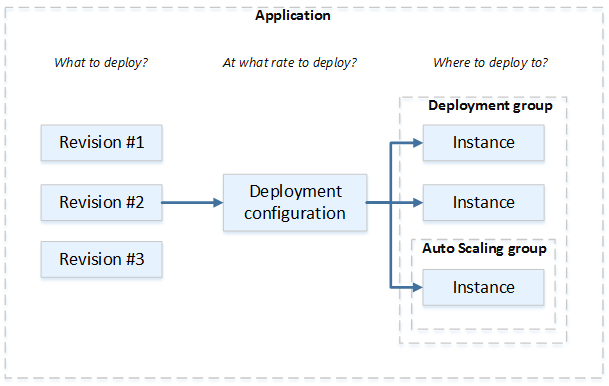
The deployment workflow is illustrated by the following diagram:

The binding between those components is established indirectly and comprises the following activities:
- create an application – see the Create action of the AWS CodeDeploy Application task
- create and/or specify a deployment group – see the Create action of the AWS CodeDeploy Deployment Group task
 the target instances can be provisioned with AWS CloudFormation for example – see the Create action of the AWS CloudFormation Stack task
- optionally specify a deployment configuration
- create and/or specify a deployment group – see the Create action of the AWS CodeDeploy Deployment Group task
- commit or upload the application source code (the 'Revision') – see the Upload action of the Amazon S3 Object task
- deploy an application revision for that application – see the Create action of the AWS CodeDeploy Deployment task
the AWS CodeDeploy Agent on each participating instance pulls the revision from the specified Amazon S3 bucket or GitHub repository and starts deploying the contents to that instance, following the instructions in the AppSpec file that's provided
Frequently Asked Questions (FAQ)
, multiple selections available,