- unmigrated-wiki-markup
Documentation for Tasks for AWS 2.7 – other releases are available in the Tasks for AWS Documentation Directory.
View
or visit the current documentation home.
AWS Security Credentials
- Steffen Opel [Utoolity]
AWS Credentials Sources
You currently have three options to provide AWS Security Credentials:
Identity Federation for AWS
Federated Amazon Web Services access
This is the recommended approach to share and manage AWS credentials:
- It provides benefits like easy credentials sharing and reuse, fine grained access control for AWS resources, strong encryption and more (please refer to the Identity Federation for AWS Documentation for more information regarding the available features and implied advantages).
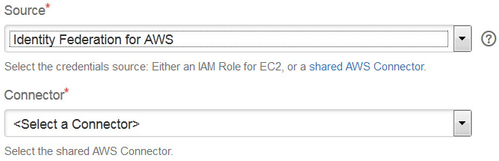 Please refer to the Identity Federation for AWS Administrator's Guide for details on how to configure the connectors.
 this option requires at least one AWS Connector to be configured with System Scope to allow usage from Bamboo builds, where no user session is available
- a connector yields a set of temporary credentials on task execution (optionally limiting the IAM permissions)
- you can configure multiple connectors to provide credentials with different IAM permissions tailored for specific use cases
 you can also facilitate Bamboo variables to ease managing connectors as outlined in How to parametrize the AWS connector via a Bamboo variable
IAM Role for EC2 (Agent)
As of release 2.5, you can use IAM Roles for Amazon EC2 to optionally skip credentials configuration all together: if an agent happens to run on an EC2 instance started with an instance profile (IAM role), the tasks can be configured to facilitate those credentials. Of course, the underlying IAM role needs to have a sufficient policy attached to grant the the required permissions for the task at hand.
 This feature requires the Amazon EC2 instance running the agent to be started with an EC2 instance profile. There are three different scenarios:
- local agents - requires the hosting Bamboo server itself to run on EC2
- remote/elastic agents - requires the remote agent to run on EC2
- elastic agents - requires the elastic agent to run on EC2
 Elastic Bamboo only supports configuring elastic images with an instance profile as of Bamboo 5.6.
Inline
No Real Encryption
This is not recommended, but easy to get started with:
- The common pair of AWS security credentials (an AWS Access Key Id and an AWS Secret Key) is entered directly in each task and persisted after being processed with the Bamboo EncryptionService API.
Please note that the Bamboo EncryptionService API naming is misleading for the time being - as properly phrased in the method summary of com.atlassian.bamboo.security.EncryptionServiceImpl, the decrypt()/encrypt() methods just provide means to obfuscate sensitive data.
- Real encryption is available by using the integration with Identity Federation for AWS (Bamboo) instead.
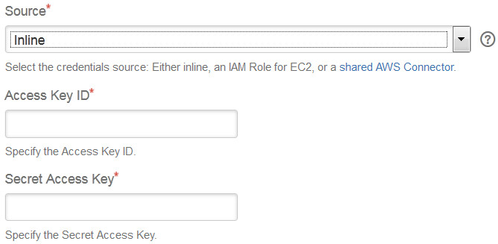 If you prefer this solution, you might still want to ease credentials reuse a bit via variable substitution as follows:
- configure Access Key and Secret Key as e.g.
${bamboo.awsAccessKeyPassword}and${bamboo.awsSecretKeyPassword} - define plan and/or global variables for the configured variable names (i.e.
awsAccessKeyPasswordandawsSecretKeyPasswordgiven this example) with the actual credentials, which will then be substituted on task execution accordingly
AWS China (Beijing) Region
The AWS China (Beijing) Region is an API compatible, but otherwise isolated AWS Region designed to allow China-based and multinational companies to make use of a broad collection of AWS services while remaining in compliance with China's legal and regulatory requirements.
The AWS China (Beijing) Region is supported as such, however:
- The
cn-north-1region requires dedicated credentials, see Announcing the AWS China (Beijing) Region: "Customers who wish to use the new Beijing Region are required to sign up for a separate set of account credentials unique to the China (Beijing) Region. Customers with existing AWS credentials will not be able to access resources in the new Region, and vice versa." - Due to being a non China-based company, we are not currently in the position to test this add-on with the AWS China (Beijing) Region directly. However, the API is compatible in general and this add-on should just work accordingly - please get in touch if things do not work as intended, we are very interested to collaborate on the necessary adjustments.
AWS GovCloud (US) Region
The AWS GovCloud (US) Region is an API compatible, but otherwise isolated AWS Region designed to allow US government agencies and customers to move sensitive workloads into the cloud by addressing their specific regulatory and compliance requirements).
The AWS GovCloud (US) Region is an opt-in Labs Feature and not supported yet:
- The
us-gov-west-1region requires dedicated credentials, see How do Government agencies, contractors and customers access the AWS GovCloud (US) Region?: "Customers cannot sign up for AWS GovCloud (US) through the traditional, online AWS sign up process. AWS must engage with the customer directly to sign an agreement specific to the AWS GovCloud (US) Region. [...]" - Due to being a non US company, we are not currently in the position to test this add-on with the AWS GovCloud Region (US) directly. However, the API is compatible in general and we have done our best to address the documented differences - please get in touch if things do not work as intended, we are very interested to collaborate on the necessary adjustments.